FAB Balance Check - Online & Offline
With FAB balance check, you can easily track and manage your finances in the UAE. In 2026, banks like First Abu Dhabi Bank (FAB) continue to make banking convenient. You can easily check the account balance from anywhere and anytime through both online and offline methods. To help you get acquainted ...read more
 Zero Balance Account
 Chance to Win AED 1 Million a Month
 Virtual & Physical Debit Card

Open bank account instantly with zero maintenance fees

What is FAB Balance Check in UAE?
FAB balance check is a key facility offered by First Abu Dhabi Bank in the UAE. It refers to the process of checking the available balance in your bank account. This feature is crucial as it helps you track transactions, spending habits, and more. Furthermore, if you have a salary account with FAB, you can quickly check your salary deposit.
You can find various convenient channels for the check — the FAB mobile banking app, online banking, and ATMs. These options allow you to instantly access your account details and monitor your funds. All the services are secure and user-friendly, ensuring you can manage your finances easily, anytime, and anywhere in the UAE.
Why is the FAB Bank Balance Check Important in the UAE?
When you check your FAB account balance regularly, you can enjoy several key benefits. You can, for instance, stay informed about your available funds. By spotting suspicious transactions early, you can even save yourself from potential fraud.
Additionally, by regularly reviewing your balance, you stay aligned with your savings goals and avoid overspending, particularly when shopping. This simple habit ensures you manage your finances more effectively and protect your hard-earned money.
Find below the key reasons to check FAB bank balance regularly -
- Notice and report suspicious transactions easily
- Monitor your spending habits
- Avoid overdraft fees and extra charges from the bank
- Check the salary deposit by the employer
- Spot automated subscriptions and cancel them, if not necessary
- Save more by avoiding overspending
- Make better financial decisions
FAB Balance Check Online and Offline Methods
As mentioned earlier, you can find multiple ways to check FAB balance online and offline. Let’s find out more about the methods to help you make a FAB balance check without any hassles.
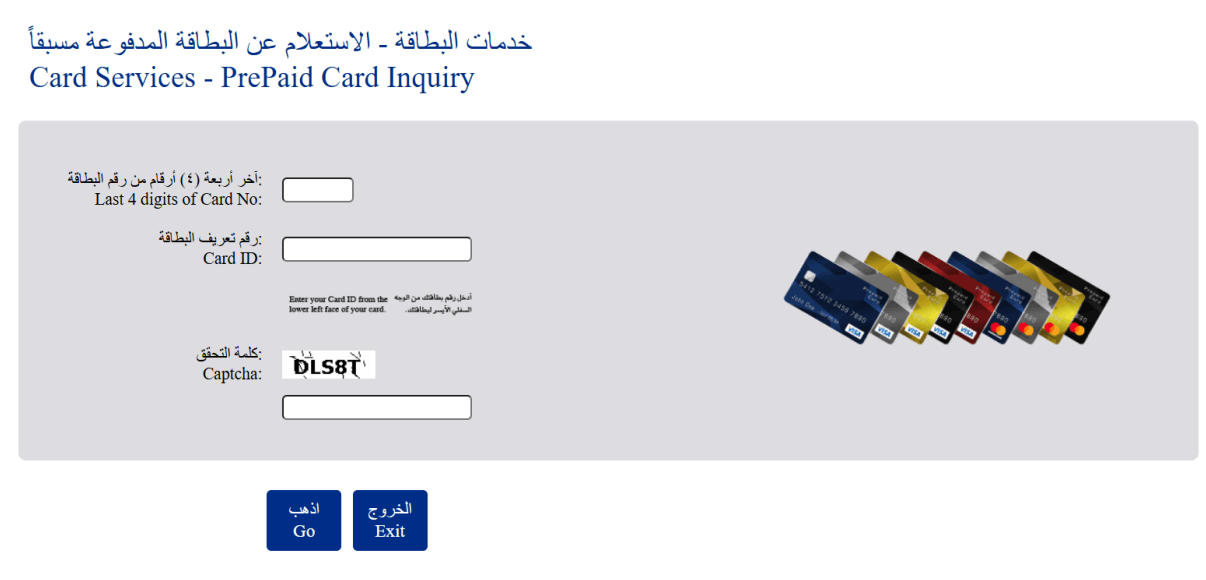
FAB Bank Balance Check Through PPC Inquiry Portal
FAB offers a Payment Prepaid Card (PPC), which is a prepaid payment card designed mainly for business and corporate use. It’s not a traditional debit or credit card linked to a bank account. Instead, it’s a preloaded card that you can use for payments and cash withdrawals without needing a regular bank account.
Follow these key steps to check the balance with this method -
- Go to the official website of FAB Payment Prepaid Card’
- Look for the option of ‘Free Balance Check’
- Click on the option to get to the official card inquiry page (https://ppc.magnati.com/ppc-inquiry)
- Enter the required details, as shown in the screenshot below
- Hit the ‘Go’ button.
- You will get the key details - currency balance, card status, recent transaction history, and much more
 How to Check FAB Balance Using Mobile Banking?
All the bank’s services are at your fingertips with the FAB mobile app. It lets you know your account balance in a single tap. Let’s understand the key steps of checking your bank account balance with this app -
- Download the FAB mobile app through the Google Play Store, Apple Store, or Huawei App Store.
- After installing the FAB app, log in with your registered mobile number. If you are a new user, sign up with your credentials.
- To start the app, you will get an OTP on your registered mobile number.
- Provide the code and enter the required account details. This could be the FAB account number, credit card number, and so on.
- You will get the ‘FAB Account Balance’ on the apps homescreen.
The FAB mobile app also lets you access various facilities like e-statement download, blocking and unblocking cards, chequebook requests, downloading transaction history, and more.
FAB Mobile Banking App: Common Issues and Fixes
- Login issues? Check your internet connection, refresh the page, and reinstall the FAB mobile app.
- If your app has been crashing or is slow, update it or restart the phone.
- In case of unidentified transactions, contact the bank immediately and block the card.
- Facing issues with the balance update? Refresh the page or log in again to get the updated balance.
FAB Balance Check Via SMS Alert
You can also check your FAB account balance via SMS alerts. This is a quick and convenient option, especially if you are without an internet connection. Once you activate SMS banking alerts, you receive automatic notifications on your registered mobile number whenever there is a debit or credit transaction in your account. These alerts help you stay updated on your available balance.
In addition, FAB allows you to request your account balance via SMS by sending a specific code, such as to the banks designated SMS number. You will receive a reply message showing your current available balance on the same registered number.
FAB Balance Check Through Online Banking (Official Website)
Online banking is perhaps the most convenient way to check your FAB account balance from anywhere. First Abu Dhabi Bank provides a secure online banking platform with advanced security measures, meaning you can easily access your account information without any worries.
To use this method, visit the official First Abu Dhabi Bank website on your desktop or laptop and log into your online banking account. Once logged in, you can view your account balance along with other account details.
Follow the steps below to complete a FAB bank balance enquiry through online banking:
- Go to the official website of First Abu Dhabi Bank (www.bankfab.com)
- Choose the login option at the top right corner of the page
- Click on the ‘Personal Online Banking (UAE)’ option under the Login option
- Log into your account with the correct username and password
- Complete the authentication process - enter the OTP and click on the Accounts option on the dashboard
- Choose the account and click on Account Balance to view the current balance in it
Besides making a FAB account balance check, you can also use online banking to get account details, download e-statements, transfer funds, manage beneficiaries, pay bills online, and more.
Steps to Make FAB Bank Balance Check at ATMs
To check your FAB account balance without the internet or a mobile phone, you can simply visit the nearest ATM. This offline method is especially useful when you are on the move or dont have access to online banking services.
First Abu Dhabi Bank has an extensive network of ATMs across the UAE, making it easy to locate a nearby machine. By using your FAB debit card at the ATM, you can quickly view your account balance and access other basic account details.
Follow the given steps to check the balance quickly:
- Find the nearest FAB ATM
- Insert your card in the machine
- Enter the correct PIN
- Choose the preferred language
- Click on the ‘Balance Enquiry’ option
- Select the account for which you want to check the balance
- Click on account balance details and get the details
- If you want, you can get a printed receipt
After checking your balance, collect your card and receipt (if printed). Also, make sure the transaction is completed before leaving the ATM. Once the screen returns to the Welcome or home screen, you can safely exit.
Important: To locate the nearest ATM, use the &;ATM Locator’ facility on the official website of FAB.
Popular FAB ATMs in the UAE
| Emirates | Location | Service Time |
|---|---|---|
| Abu Dhabi | Aaliyah Plaza Hypermarket | 24x7 |
| Abu Dhabi | Al Falah Center | Sunday to Saturday: 8 AM - 12 PM |
| Dubai | ADNOC - Al Jaflia | 24x7 |
| Dubai | Dragon Market | Sunday to Saturday: 8 AM - 12 PM |
| Ajman | SKMC | 24x7 |
| Al Ain | Jimi Mall | Saturday to Thursday: 8 AM - 10 PM Friday: 8 - 12 AM |
| Fujairah | Lulu - Fujairah | Saturday to Thursday: 8 AM - 10 PM Friday: 8 - 12 AM |
How to Make a FAB Bank Balance Enquiry at a Branch?
Branch visit is another offline method to check FAB account balance in the UAE. It’s an ideal option if you want to speak to a bank representative in person or feel more comfortable visiting a branch than using online services.
Here are the key steps to use this method for FAB balance check -
- Visit your nearest FAB branch (use the branch locator on the bank website)
- Carry the required documents related to your account, such as your Emirates ID, Bank details, Credit or debit card
- Contact the bank representative or customer service desk and request an account balance enquiry
- Submit the necessary verification details and receive information about your available account balance
While visiting a branch, make sure to go during the official working hours. You can confirm branch timings on FAB’s official website or through an online search before planning your visit.
FAB Bank Balance Check Through Phone Banking
As a FAB account holder, you can also check your balance through phone banking. This method does not require internet access or a mobile app - you simply need to place a call and follow the instructions or speak to a customer service representative to get assistance.
You can contact FAB customer support at the following numbers -
- Within the UAE: 600 52 5500
- Outside the UAE: +971 2 681 1511
FAB Salary Check With Payit Wallet App
You can also check FAB salary card balance using the Payit Wallet app, powered by First Abu Dhabi Bank. Once you link your FAB salary card or account, the app shows your available balance instantly on your phone. It’s a simple and hassle-free way to do a FAB salary card balance check in UAE.
Here’s how to check FAB balance online with the Payit app -Download the FAB Payit app
- Use the credentials and start the app
- Log into your account using the correct PIN or biometric authentication
- Click on ‘Wallet Balance’ to check the available balance
Besides the balance check facility, this app offers several other benefits -
- Lifetime free to use
- No minimum monthly balance requirement
- Easy money transfer
- Pay bills and international mobile DTH top-ups
- Quick money withdrawal
- Easily link multiple government prepaid cards
- Ratibi cardholders can get instant money of up to 50% of their salaries
Is FAB Bank Balance Enquiry Available on WhatsApp in the UAE?
No, FAB bank balance enquiry is not currently available through WhatsApp in the UAE. To check your balance with FAB, you can use the mobile banking app, online banking, ATMs, and more. These methods allow you to easily access your account details and manage your finances securely.
Common Problems Related to FAB Balance Check in UAE
Checking your FAB salary card balance should be quick and hassle-free. But sometimes, unexpected issues can get in the way. Whether you're using the mobile app, ATM, or online banking, a few common problems might stop you from accessing your balance.
Here are the main issues you might face -
- App not opening or showing errors
- Slow or unstable internet connection, leading to errors in website opening
- Cards not recognised by the ATM
- Balance not showing in the ATM
- Salary deposits delayed
- Outdated mobile number blocking alerts
- Temporary bank system maintenance
Tip to Efficiently Check Your FAB Balance in UAE
With the following tips, you can easily resolve all the issues listed above regarding FAB balance checks
- Use the Latest FAB Mobile App: Make sure that your app is updated for the best performance. If required, clear the cache as well.
- Check Internet Connection: For online checks, use a strong internet connection. Just like the app, you can clear the cache of your browser and try again.
- Try a Different ATM: If you’re at an ATM that’s not recognising your card, go to a different one. If the problem continues, connect with the bank to check the card.
- Keep Your Details Updated: Make sure your mobile number and other details with the bank are updated. This can save you from any issues with SMS alerts.
- Check Bank Updates: Sometimes, the online account or the app may be down due to system maintenance. In this case, wait for some time and try again.
Wrapping Up
Opening a bank account with FAB comes with significant benefits. You can enjoy advanced banking features that make your banking experience convenient. One of the key benefits is the ability to easily check your account balance through various methods.
If you're tech-savvy, online options like mobile banking, online banking, and the Payit app are perfect for FAB Bank balance checks. However, if you prefer a face-to-face interaction, visiting a branch is an ideal option.
In case you're facing internet issues, you can still perform a FAB balance check using alternatives like phone banking or ATMs. Whatever method you choose, FAB ensures you have multiple convenient ways to stay updated on your balance.
Frequently Asked Questions
You can check FAB balance online through internet banking (via official website), FAB mobile app, and the Payit Wallet app.
Yes, you can check your FAB account balance even if you're outside the UAE. You can do this through the mobile app, phone banking (by dialling +971 2 681 1511), or through online banking.
No, FAB balance checks are usually free through online banking, mobile app, and SMS alerts.
Yes, through online banking and the FAB mobile app, you can make a FAB salary check in the UAE.
You Might Be Interested In

More From Bank Accounts
- Recent Articles
- Popular Articles
 07 Jan 202610 Best Savings Account in UAE - January 2026Best Savings Account in UAE - Check Out the List of top 10 best Savings Account in UAE for January 2026 with Features & benefits. Also, know the eligibility criteria & Document Requirements for all Savings Accounts.
 07 Jan 2026Best Zero Balance Account in UAE (2026) | 0 Balance Account UAEBest Zero Balance Account in UAE - Open Zero Bank Balance Account in UAE of top UAE's Bank. Also know interest rate, Currency, Business Support, Benefits & More
 27 Dec 2024ADIB Business Account - Eligibility, Document Required, Application ProcessADIB Business Account - Easily Open ADIB Business account in Dubai, UAE and also know types, eligibility, document requirement, Fees & Charges, & more.
 29 May 2025Al Masraf Business Account - Eligibility, Document Required, Application ProcessAl Masraf Business Account - Easily Open Al Masraf Business account in Dubai, UAE and also know types, eligibility, document requirement, Fees & Charges, & more.
 21 Jun 2025NBF Bank Business Account - Eligibility, Document Required, Application ProcessNBF Bank Business Account - Easily Open NBF Business account in Dubai, UAE and also know types, eligibility, document requirement, Fees & Charges, & more.
 07 Jan 2026 ADIB Salary Account - Eligibility, Document Required, Application ProcessADIB Bank Salary Account - Easily Open ADIB Salary account in Dubai, UAE and also know types, eligibility, document requirement, Fees & Charges, & more.


- Follow Us :


