DIB Credit Card Statement
DIB credit card statements are shared with every Dubai Islamic Bank (DIB) cardholder on a monthly basis. This document is quite useful as it details all your card spends in one billing cycle. Getting your DIB card statement is easy — you can use both online and offline modes for the same.

Best credit cards with 0 Annual fee*

- Cashback up to AED 2,000
- Rewards + Welcome Offers
- No Annual Fee
- Travel benefits
- Dining Discounts
- Entertainment Benefits

Which Details are Included in Your DIB Credit Card Statement in UAE?
With the statement of your DIB credit card in UAE, you can access quite a few details. Here’s what you can expect —
- Bill Summary: This is generally one of the first sections of your statement. It details the total amount due and your card bill’s due date.
- Minimum Amount Due: Alongside the total due, the DIB card statement also shows the minimum amount due for that billing cycle. You’ve to pay this amount to avoid late payment charges and other penalties.
- Billing Cycle Summary: This section showcases the individual transactions that you have made through your card in one billing cycle.
- Credit Limit: It highlights your total approved credit limit alongside your currently available credit limit. This is a good way to know your credit utilisation ratio as well.
- Rewards & Offers: Lastly, the DIB credit card statement contains the total number of reward points you have accumulated. This includes the points earned in this billing cycle as well as your total available reward points.

Why is it Important to Regularly Review Your DIB Card Statement?
By regularly reviewing your DIB card statement, you can stay aware of your card’s status. You can review transactions and rewards, and even spot unusual transactions (if any). Here are some more reasons why you should check your statement —
- Fraud Detection: Your DIB credit card statement lists all transactions made with your card. If there have been any unauthorised or unknown transactions, you can instantly spot them and report them to the bank.
- Track Spending Patterns: By studying your statement, you can easily check your spending across categories. This way, you can find how much you’re spending at which place and cut down on unnecessary expenses.
- Payment Reminder: A statement always works as a timely payment reminder for your credit cards. It clearly shows your bill’s due date and amount.
- Rewards & Offers: Your DIB card statement also highlights your rewards and offers. You can factor those rewards into your spends and lower your expenses with relevant discounts.
- Accurate Reporting: Checking your statement regularly can help you reduce the risk of inaccuracies related to your card and account. This can save your finances in the long term, especially with respect to credit scores.
How to Access Your DIB Credit Card Statement Online in UAE?
You can now access your DIB credit card statement from anywhere through e-statement. By registering for the same, you can receive monthly statements for your DIB card.
How to Register for DIB Card Statements Online?
The registration facility is available through online banking and mobile banking. Find below the steps for the same —
- Log into your DIB Internet Banking portal (online or through the mobile app)
- On your dashboard, find the ‘Settings’ option
- Click on ‘e-statement
- Choose the card for which you want the e-statement
- Select ‘Yes’ as the Registration option
- Enter your email address
- Choose the frequency
- Disable ‘physical statements’ and proceed
However, if you wish to check the statement or the transactions for a particular period, you need to follow different steps.
How to Check DIB Credit Card Statement Online?
Here’s how you can get your latest statement online —
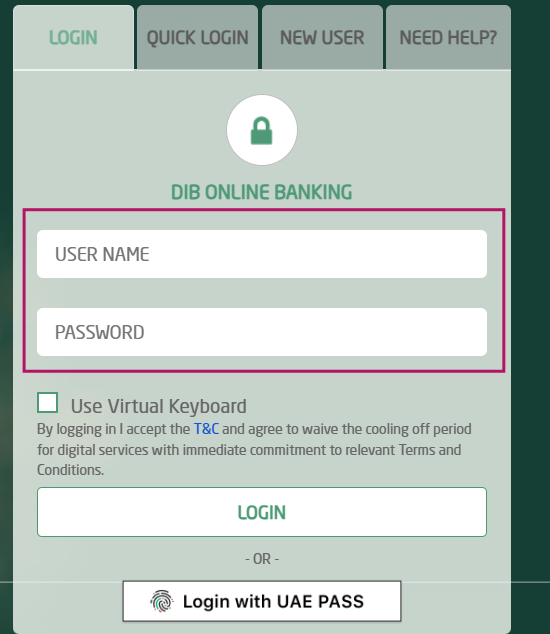
- On the DIB Online Banking page, log into your account
- Under the ‘Menu’ option, hit the ‘Statement’ button
- Choose the option to ‘Customise’
- Here, you can select the period for which you want to see your statement
- Choose the ‘View’ option to see the statement, after which you can click on the PDF icon to download your statement
How to Check DIB Card Statement on Your Phone?
Apart from online banking, you can also view and download your statement via mobile banking. The process is quite similar to that for online banking.
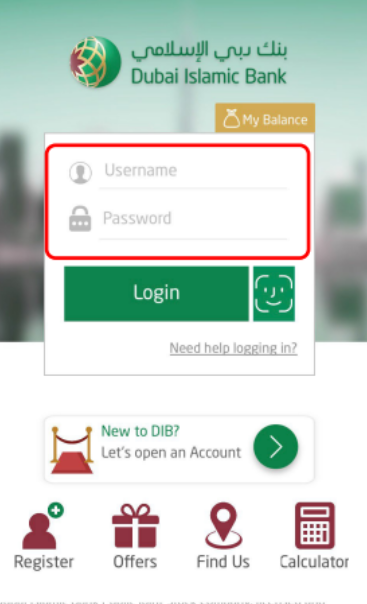
After registering for the statement, here’s what you need to do —
- Log into your account on the DIB Mobile Banking portal
- Navigate to the ‘Settings’ option
- Choose the option for ‘Statement’
- Mention the period for which you wish to see the statement
- After you confirm your email ID, you’ll get your DIB card statement on the same address

How to Get Your DIB Card Statement via Email or SMS in UAE?
As mentioned earlier, once you register for DIB card statements, you automatically get them at your registered mail address. When you choose the mobile banking option, you still get the statement on your email.
Note that you cannot get your statement through SMS banking.
How to Get Your DIB Card Statement Offline?
You can also get a physical statement for your DIB credit card offline.
- Visit your nearest DIB branch in person
- Connect with a bank representative
- Inform them about the period for which you want a statement
- Keep your account details and identification ready (if required)
- Collect your printed statement (the bank may charge a fee in this case)
Fees and Charges for DIB Card Statement in UAE
For regular DIB credit card statements (at your specified frequency), you don’t have to pay any fee. The bank also does not require any fees for a custom statement either. However, for a duplicate statement as per request, a small fee of AED 47.25 may apply.
Common Issues While Accessing DIB Card Statement, and How to Fix Them
With netbanking and mobile banking, it’s easy to get your DIB credit card statement. However, in some cases, you may face some difficulties. Here are some common issues and what you can do to resolve them —
- Statement not showing for the chosen dates
This can be the case if the billing cycle has not ended for the dates that you chose. In this case, you can wait for the cycle to end or check the statement for other dates.
- Certain transactions missing
Some transactions may fall under the next statement. In this case, you won’t find them in the current one. For this, if available, you can check unbilled transactions.
- Statement not available on email
In some cases, the statement may get delayed due to technical glitches. At times, it may also be sent to the spam folder. You can check all the folders of your mail or connect with the bank in case of delays.
- Unable to download PDF
Many issues can cause this —
- Slow or poor internet connectivity
- Old device
- Cache data
- Unsupported browser
The best way to avoid them is to keep your app and browser updated, clear your cache regularly, and so on.

FAQs
Ans: You can get a Dubai Islamic Bank credit card statement directly from your internet banking portal or the mobile banking application. You can also sign up to receive your statement at your email address or physical address.
Ans: Yes, you can get your DIB credit card statement online through the internet banking portal or the mobile application. The mobile app, in fact, is quite convenient and lets you access the statement at your fingertips.
Ans: If you don’t get your DIB card statement, check whether your registered mail address is correct. Also, check your spam folder. If the issue is still there, contact the bank or visit a branch nearby.
More From Credit Cards
- Recent Articles
- Popular Articles
 08 Jan 2026Marriott Bonvoy Credit Cards in UAE – Rewards & BenefitsExplore Marriott Bonvoy credit cards in UAE. Compare rewards, travel perks, annual fees & eligibility. Apply online for exclusive hotel benefits.
 19 Dec 2025Best Credit Cards in Dubai, UAE for January 2026Best Credit Cards in Dubai,UAE - Check Out the List of top 11 best Credit Card in UAE for January 2026 with Features & benefits. Also, know the eligibility criteria & Document Requirements for all Credit Cards.
 12 Dec 2025Emirates NBD vs ADCB Credit Cards: Which One Is Better in UAE 2026?Choosing between an Emirates NBD and ADCB credit card? See full comparison of benefits, fees, cashback, travel perks and best cards for2026.
 19 Dec 2025QR Code Payments UAE: Fast & Secure TransactionsDiscover how QR Code Payments UAE enable secure, quick, and cashless transactions. Learn benefits for businesses and users in the UAE digital economy.
 24 Nov 2025HSBC Travel Insurance Credit Cards - Apply Online HSBC Travel Card in UAELooking for HSBC credit cards with Travel Insurance in the UAE ? - Check out & apply online for Best HSBC travel credit cards in UAE, Dubai. Also Check features & benefits, eligibility, fees, & more.
 22 Aug 2025How to Apply for a Credit Card on 10000 Salary in UAE ?Looking for a credit card with a minimum salary on AED 10000 UAE? Here's how to get a credit card if you earn 10000 Salary. Check & apply for a credit card on an AED 10000 salary in UAE


- Follow Us :


